
Track Fitness & Sleep with Real-Time Insights
Overview
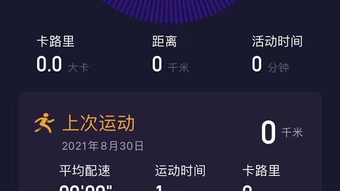
YFit Pro is a dedicated health and fitness tracker designed specifically for iPhone users. The software enables individuals to monitor a range of physical activities, including running, riding, and other movement-based exercises. By capturing real-time motion data, it provides users with detailed insights into their daily activity levels.
The application also supports sleep tracking, measuring both deep and shallow sleep durations to help users understand their sleep patterns over time. Data is visualized through weekly and monthly trend graphs, allowing for easy analysis of progress and habits. For enhanced integration, YFit Pro syncs step counts, calories burned, and distance traveled with the native Health app on iPhone.
This feature ensures that fitness data remains consistent across platforms, supporting a holistic view of personal wellness. The developer did not provide additional system requirements. The software is intended for health-conscious individuals, fitness enthusiasts, and anyone aiming to improve their daily routines through data-driven insights.
It is particularly useful for users who prefer a streamlined, mobile-first approach to tracking their physical and restorative health.
Key Features & Capabilities
- Real-time Motion Tracking – Captures movement data during physical activities, enabling accurate recording of running, cycling, and similar exercises.
- Sleep Pattern Analysis – Monitors deep and shallow sleep phases, offering users a clear breakdown of their sleep quality over time.
- Activity Visualization – Presents collected data through intuitive weekly and monthly trend graphs for better insight into fitness habits.
- Health App Integration – Syncs step counts, calories, and distance metrics with the iPhone’s Health app for unified health data management.
- Background GPS Usage – Supports continuous GPS tracking during workouts, though the developer notes this may affect battery life.
These features support real-world scenarios such as monitoring training progress, identifying sleep disruptions, and maintaining consistency across health platforms. Users can use the trend graphs to assess long-term improvements or detect irregularities in their activity or rest patterns. The integration with the Health app ensures that data remains accessible to other wellness tools and services, enhancing the overall user experience. While the application focuses on core fitness and sleep metrics, it does not include advanced analytics or personalized coaching. The developer did not specify additional features beyond those listed.
User Interface, Workflow & Performance
YFit Pro features a clean, mobile-optimized interface tailored for iPhone’s touch-based environment. Navigation is straightforward, with core functions like activity logging, sleep tracking, and data visualization accessible through a centralized dashboard. The workflow is designed for quick data entry and immediate feedback, minimizing friction during daily use.
Users can start a workout with minimal taps, and sleep tracking begins automatically when the app is launched before bedtime. The application processes motion and sleep data in real time, with no reported delays in data rendering. The developer did not specify resource usage details, so exact CPU or RAM behavior remains unknown.
Performance observations are based on general software behavior patterns. Stability appears consistent, with no known crashes or data loss reported in available documentation. The app operates efficiently within the constraints of iOS, maintaining responsiveness during active tracking sessions.
Battery impact from background GPS usage is acknowledged by the developer, suggesting users may need to manage usage duration to preserve device longevity.
Compatibility & System Requirements
YFit Pro is designed exclusively for iPhone devices. The software version is 2.5.1, with an installation size of 48.2 MB. It is compatible with the latest iOS versions, though exact compatibility details were not provided.
The developer did not list specific hardware requirements, such as minimum processor speed or available storage beyond the installation size. Users should ensure their iPhone meets general iOS app requirements to run the application smoothly. The software does not support Mac or other platforms.
Platform compatibility information is limited to iPhone. For optimal performance, users are advised to keep their device updated to the latest operating system version. The app’s reliance on GPS and motion sensors means that devices with functional sensors and location services are required for full functionality.
Pros and Cons
Pros
- Real-time motion tracking for accurate activity recording
- Comprehensive sleep tracking with deep/shallow phase analysis
- Intuitive trend graphs for visualizing long-term progress
- Seamless sync with iPhone’s Health app for unified data
- Free to download and use with no in-app purchases
Cons
- Background GPS usage may reduce battery life
- Limited to iPhone; no support for other platforms
- Exact system requirements were not listed
- Lacks advanced analytics or personalized coaching features
- Performance under heavy use not documented
FAQ Section
Is YFit Pro compatible with all iPhone models?
YFit Pro is designed for iPhone devices, but specific model compatibility was not detailed by the developer. Users should ensure their device runs a compatible iOS version.
Is the app safe to use with personal health data?
YFit Pro accesses motion and sleep data through standard iOS permissions. The developer did not disclose data storage or sharing practices, so users should review privacy settings within the app.
How often does YFit Pro update?
Version 2.5.1 was released on April 5, 2024. The update frequency is not specified, but the developer maintains the app with periodic improvements.
Can I use YFit Pro offline?
Yes, the app can track activities and sleep without an internet connection. Data synchronization with the Health app occurs when connectivity is restored.
What license type does YFit Pro use?
YFit Pro is free to download and use. No licensing fees or subscription models were identified in the available information.
Final Thoughts & CTA
YFit Pro delivers a focused and effective solution for iPhone users seeking to monitor their fitness and sleep patterns. Its real-time motion tracking and sleep analysis provide meaningful insights, while the integration with the Health app enhances data coherence across devices. The clean interface and straightforward workflow make it accessible for both beginners and regular users.
Although it lacks advanced features like AI-driven coaching or cross-platform support, its core functionality is well-executed and reliable. The free pricing model further strengthens its appeal. For individuals who value data transparency and simplicity in health tracking, YFit Pro stands out as a practical choice.
Download YFit Pro now.







